
iblai-analytics
Add analytics dashboard page to your Next.js app
How do I install this agent skill?
npx skills add https://github.com/iblai/vibe --skill iblai-analyticsIs this agent skill safe to install?
- Gen Agent Trust Hubpass
This skill allows developers to integrate an analytics dashboard into a Next.js application using the official ibl.ai SDK and CLI. It includes standard procedures for updating vendor tools and fetching configuration templates from official repositories. All activities align with expected developer workflows for this vendor.
- Socketpass
No alerts
- Snykpass
Risk: LOW · No issues
- ZeroLeakspass
Score: 93/100 · 2 sections analyzed
What does this agent skill do?
/iblai-analytics
Add an analytics dashboard with a tabbed layout (AnalyticsLayout):
Overview, Courses, Programs, Users, Topics, Financial, Transcripts,
Reports. Each tab is a Next.js route under /analytics/.
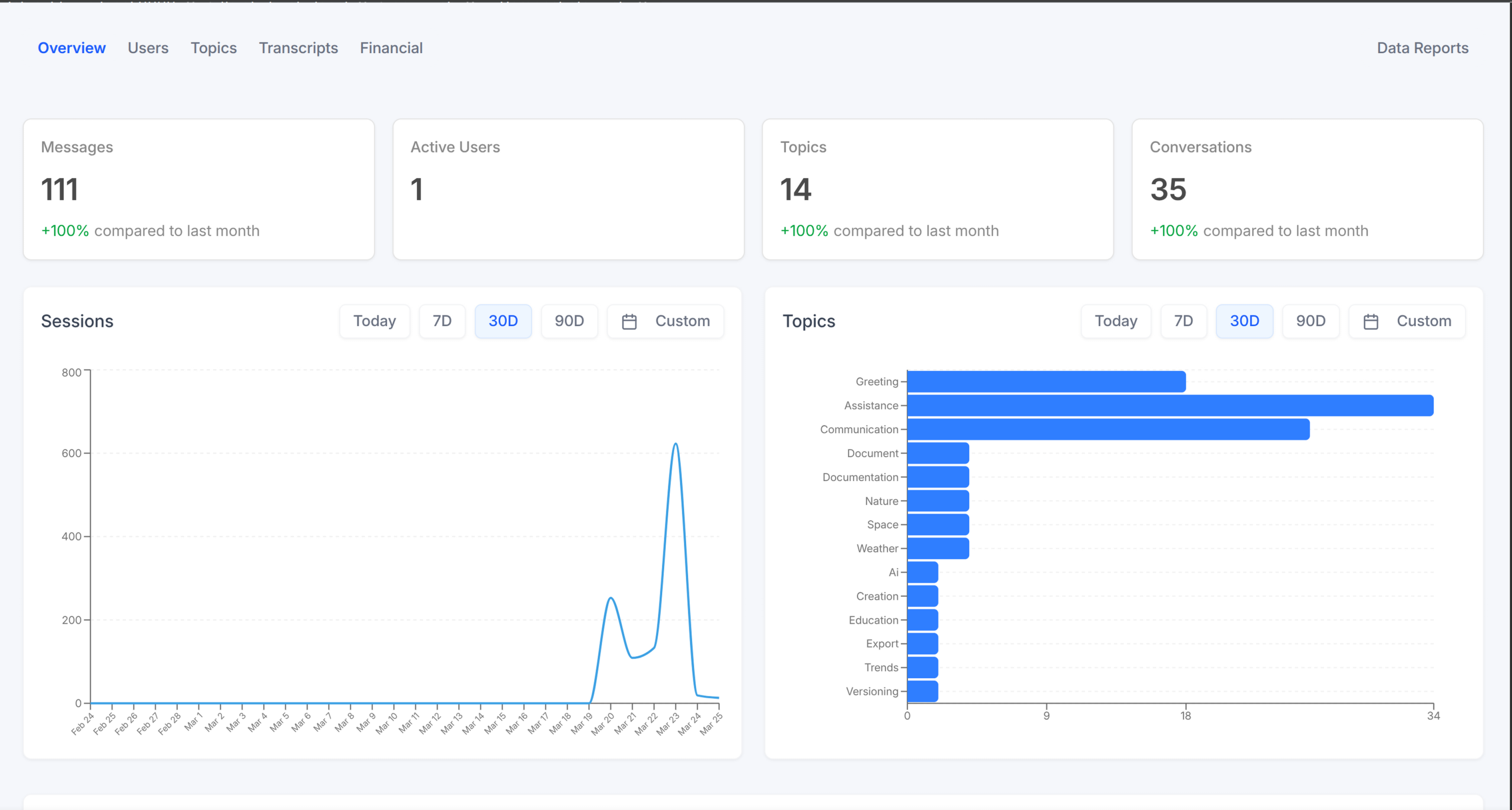
Template: the page this skill creates is bundled as
assets/analytics-page.tsx.j2. See/iblai-scaffoldfor the{{ }}contract.
Do NOT add custom styles to ibl.ai SDK components. Do NOT implement dark
mode unless asked. Follow the component hierarchy: ibl.ai SDK
(@iblai/iblai-js) first, then shadcn/ui (npx shadcn@latest add).
Prerequisites
- Auth set up (
/iblai-auth) - MCP server + skills configured (
@iblai/mcpin.mcp.json) iblai.envpopulated withPLATFORM,DOMAIN,TOKEN. If missing:curl -o iblai.env https://raw.githubusercontent.com/iblai/vibe/refs/heads/main/iblai.env
Create the Page
Render assets/analytics-page.tsx.j2 into
app/(app)/analytics/page.tsx (overview only). You create the layout and
sub-pages manually (below).
Layout
Wrap pages with AnalyticsLayout + AnalyticsSettingsProvider. The
SDK layout uses bg-[#f5f7fb] internally — wrap it in a white card so
it pops against the page background.
// app/(app)/analytics/layout.tsx
"use client";

import { AnalyticsLayout, AnalyticsSettingsProvider } from "@iblai/iblai-js/web-containers";
import { usePathname, useRouter } from "next/navigation";

export default function AnalyticsLayoutWrapper({ children }: { children: React.ReactNode }) {
  const pathname = usePathname();
  const router = useRouter();
  const basePath = "/analytics";

  return (
    <div className="mx-auto w-full flex-1 overflow-auto px-4 py-8 md:w-[75vw] md:px-0">
      <div className="rounded-lg border border-[var(--border-color)] bg-white overflow-hidden">
        <AnalyticsSettingsProvider value={{}}>
          <AnalyticsLayout
            currentPath={pathname}
            basePath={basePath}
            onTabChange={(tab) => router.push(tab ? `${basePath}/${tab}` : basePath)}
          >
            {children}
          </AnalyticsLayout>
        </AnalyticsSettingsProvider>
      </div>
    </div>
  );
}
Sub-pages
All components import from @iblai/iblai-js/web-containers. Pattern:
"use client";
import { useEffect, useState } from "react";
import { AnalyticsCourses } from "@iblai/iblai-js/web-containers";
import { resolveAppTenant } from "@/lib/iblai/tenant";

export default function CoursesPage() {
  const [tenantKey, setTenantKey] = useState("");
  useEffect(() => { setTenantKey(resolveAppTenant()); }, []);
  if (!tenantKey) return null;
  return <AnalyticsCourses tenantKey={tenantKey} mentorId="" basePath="/analytics" />;
}
| Route | Component | basePath? |
|---|---|---|
/analytics | AnalyticsOverview | — |
/analytics/courses | AnalyticsCourses | ✓ |
/analytics/programs | AnalyticsPrograms | ✓ |
/analytics/users | AnalyticsUsersStats | — |
/analytics/topics | AnalyticsTopicsStats | — |
/analytics/financial | AnalyticsFinancialStats | — (does NOT accept basePath) |
/analytics/transcripts | AnalyticsTranscriptsStats | — |
/analytics/reports | AnalyticsReports | — |
All accept tenantKey (required) and mentorId="" ("" = org-wide,
not undefined). Use MCP for full props:
get_component_info("AnalyticsOverview"), etc.
Verify
pnpm build && pnpm test
pnpm dev &
npx playwright screenshot http://localhost:3000/analytics /tmp/analytics.png
Notes
- Redux store must include
mentorReducerandmentorMiddleware. initializeDataLayer()takes 5 args (data-layer v1.2+).@reduxjs/toolkitdeduped via webpack aliases innext.config.ts.- To override the SDK gray background to white, in
globals.css:.bg-\[\#f5f7fb\] { background-color: #fff !important; }
Analytics REST API
Base URL:
${dmUrl}/api/ai-analytics/and${dmUrl}/api/analytics/—dmUrlis the first arg passed toinitializeDataLayer()(sourced fromNEXT_PUBLIC_API_BASE_URL). Auth:Authorization: Token <token>Live OpenAPI: https://api.iblai.app/dm/api/docs/schema/swagger-ui/
Two namespaces: /api/ai-analytics/ (AI/agent analytics — chat, costs,
sentiment, topics, traces, audience/engagement/performance dashboards)
and /api/analytics/ (LMS analytics — content, financial, ratings,
sessions, time, users). Most endpoints scope to {org} (the
platform/tenant key).
Prefer SDK RTK Query hooks over hand-rolled fetch. Use
get_api_query_info("<hookName>") in MCP to find the relevant hook
before writing custom UI.
{user_id} in /api/ai-analytics/orgs/{org}/users/{user_id}/... is the
requesting admin's user id (RBAC + audit), not the user being
queried — pass that via filter_user_id.
Common query parameters
| Parameter | Description |
|---|---|
start_date, end_date | ISO 8601. Default range: last 7 days |
date_filter | today | 7d | 30d | 90d | all_time | custom |
granularity | hour | day | week | month |
department_id (with department_mode=1) | Scope to a department |
include_main_platform | Include main platform data. Default: true |
mentor_unique_id | Filter to one mentor/agent |
usergroup_ids[] | Filter to user groups |
platform_key | Filter to a platform |
page, page_size (or limit ≤ 100) | Pagination |
Audience — /api/ai-analytics/audience/orgs/{org}/
| Path | Returns |
|---|---|
active-users/over-time | Daily active users with vs-prior-period delta |
active-users/per-course | Active users per course |
active-users/users | List of active users |
enrollments/over-time | Daily enrollments |
enrollments/per-course | Enrollments per course |
enrollments/courses/{course_id}/over-time | Trend for one course |
enrollments/courses/{course_id}/users | Enrolled learners |
registered-users/, registered-users/over-time, registered-users/per-course | Registered user count, trend, per-course |
Engagement — /api/ai-analytics/engagement/orgs/{org}/
| Path | Returns |
|---|---|
activity | Activity heatmap |
course_completion/over-time, course_completion/per-course | Completion trend, per-course rate |
time/over-time, time/per-course, time/average-perlearner-percourse, time/average-with-over-time | Org-wide time aggregates |
videos/, videos/over-time | Org-wide video stats |
courses/{course_id}/time/{average,detail,over-time,users} | Course time metrics |
courses/{course_id}/time/users/{user_id}/{detail,over-time} | Per-learner time inside a course |
courses/{course_id}/videos/, courses/{course_id}/videos/{over-time,summary,users} | Course video metrics |
Overview — /api/ai-analytics/overview/orgs/{org}/
active-users, average-grade, courses/completions, learners,
most-active-courses, registered-users — top-level dashboard cards.
Performance — /api/ai-analytics/performance/orgs/{org}/
| Path | Returns |
|---|---|
grading/average, grading/per-course | Org-wide grade aggregates |
courses/{course_id}/grading/{average,average-with-cutoff,detail,per-learner,summary} | Per-course grade metrics |
Per-Learner — /api/ai-analytics/perlearner/orgs/{org}/
| Path | Returns |
|---|---|
learners, users | Learner roster (alternate routes) |
users/{user_id}/{activity,info,last-access} | Profile + activity |
users/{user_id}/grades/per-course | Grades per course |
users/{user_id}/overview/{engagement-index,grades/average,performance-index,time/over-time} | Score cards |
users/{user_id}/videos/{over-time,per-course} | Video stats |
users/{user_id}/courses/{course_id}/overview/{engagement-index,grade,performance-index,time/over-time} | Per-course score cards |
users/{user_id}/courses/{course_id}/grading/{cutoffs,detail,summary} | Per-course grading |
users/{user_id}/courses/{course_id}/videos, .../videos/over-time | Per-course videos |
AI Mentor / User — /api/ai-analytics/orgs/{org}/users/{user_id}/
Chat history
| Method | Path |
|---|---|
GET POST | chat-history/ (filter by start_date, end_date, mentor, sentiment, topics, filter_user_id, page) |
GET PUT PATCH DELETE | chat-history/{id}/ |
GET | chat-history-filter/ |
GET | conversation/, conversation-summary/ |
GET | my-chat-history/, my-chat-history/{id}/, my-chat-history-filter/ |
GET POST | my-chat-history-report/ (export task) |
GET | my-chat-history-report/{task_id}/, my-chat-history-report/{task_id}/download/ |
Mentors, costs, topics, sentiment, usage
| Group | Paths |
|---|---|
| Mentors | mentor-detail/, mentor-summary/, total-users-by-mentor/, mentors/{mentor_unique_id}/cost/ |
| Costs | costs/{model,permentor,peruser}/, tenant-cost/, user-cost/ |
| Topics | most-discussed-topics/, topic-overview/, topic-statistics/, topics/summary/ |
| Sentiment / feedback | sentiment-count/, user-sentiment/, rating-summary/, user-feedback/ |
| Usage | average-messages-per-session/, usage-summary/, overview-summary/, top-students-by-chat-messages/, user-cohorts-over-time/, user-metrics/, user-metrics-pie-chart/, registered-users-trend/ |
| Observations / traces / transcripts | observations/, observations/{id}/, traces/, traces/{id}/, transcripts/ |
Misc
| Path | Returns |
|---|---|
/api/ai-analytics/costs/pertenant/ | Cost grouped by tenant |
/api/ai-analytics/departments/orgs/{org}/ | Departments |
/api/ai-analytics/user-groups/orgs/{org}/ | User groups |
LMS Analytics — /api/analytics/
Accepts date_filter, granularity, metric, mentor_unique_id,
platform_key, usergroup_ids, page, limit ≤ 100.
| Method | Path | Returns |
|---|---|---|
GET | content/ | Catalog content (metric=course|program|pathway|skill) |
GET | content/details/{content_id}/ | Per-item detail |
GET | conversations/ | Conversations |
GET | financial/, financial/details/, financial/invoice/ | Financial |
GET | learners/, learners/list/, learner/details | Learners |
GET | messages/, messages/details/ | Messages |
GET | ratings/, sessions/, time/, time-spent/user/, topics/, topics/details/, users/, users/details/ | Other |
POST | orgs/{org}/time/update/ | Push time-on-platform |
RBAC
Ibl.Analytics/Core/read (viewer) or Ibl.* (tenant admin).
Per-learner and chat-history endpoints also require platform admin.
Example
curl "${dmUrl}/api/ai-analytics/audience/orgs/main/active-users/over-time?date_filter=30d" \
  -H "Authorization: Token ${TOKEN}"

curl "${dmUrl}/api/analytics/content/?metric=courses&date_filter=7d&include_overtime=true" \
  -H "Authorization: Token ${TOKEN}"
How can the creator link this skill?
Add the canonical catalog link to the repository README so users can inspect current installs and available audits. The publishing guide covers the complete discovery path.
<a href="https://skillzs.dev/skills/iblai/vibe/iblai-analytics">View iblai-analytics on skillZs</a>