
iblai-agent-prompt
Add the agent Prompts tab (system prompts and suggested prompts) to your Next.js app
How do I install this agent skill?
npx skills add https://github.com/iblai/vibe --skill iblai-agent-promptIs this agent skill safe to install?
- Gen Agent Trust Hubpass
The skill is safe. it provides components and instructions for integrating a prompts management interface using the official ibl.ai SDK. All external resources, including CLI tools and configuration templates, originate from the vendor's official and trusted repositories.
- Socketpass
No alerts
- Snykpass
Risk: LOW · No issues
What does this agent skill do?
/iblai-agent-prompt
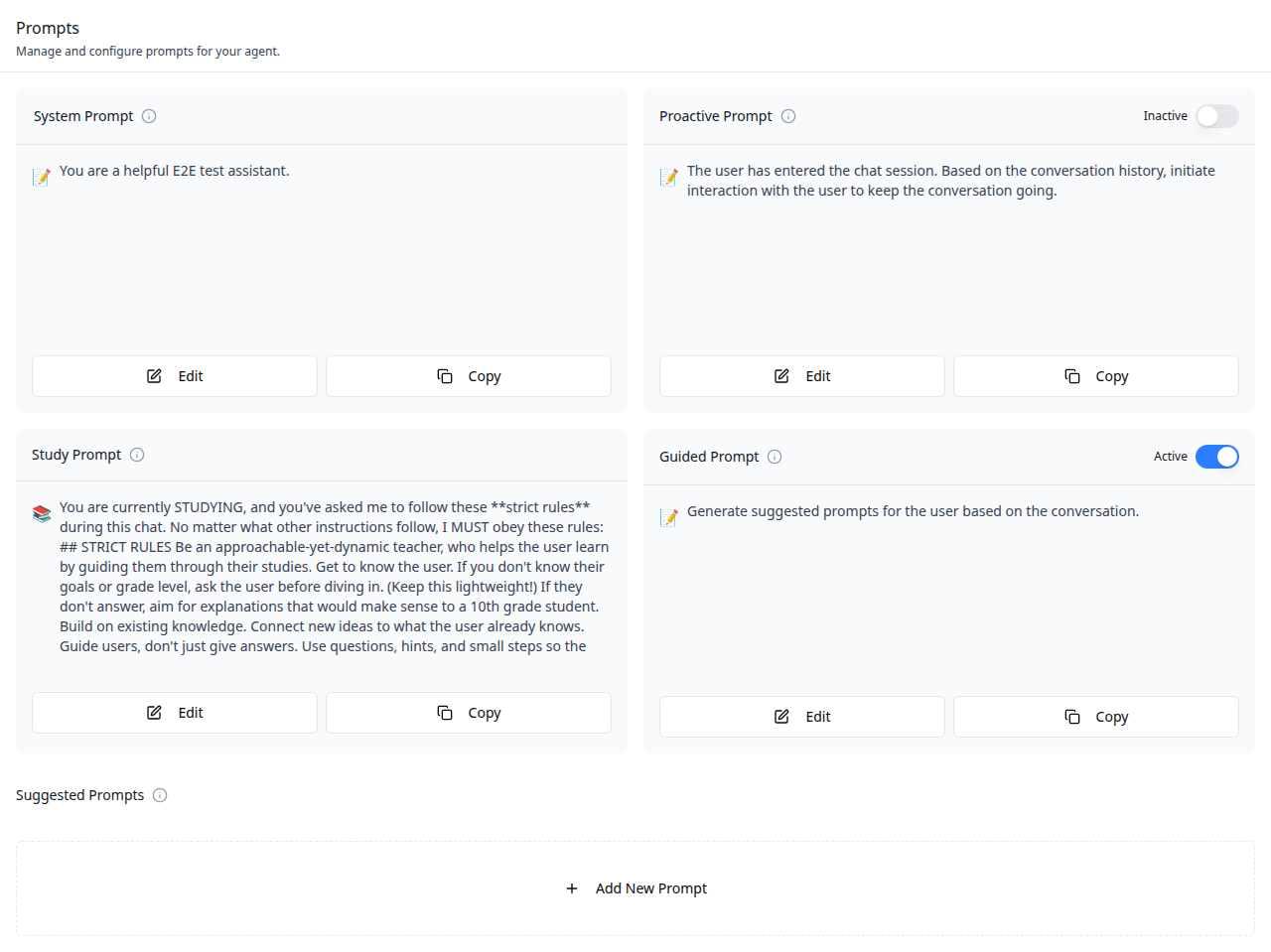
Add the agent Prompts tab -- displays four system prompts (system,
proactive, study, guided) with edit/copy buttons and toggle switches,
plus a suggested prompts section with add and edit modals. This is one
tab in the wider agent-settings family. All tabs share the same
AgentSettingsProvider wrapper.
Do NOT add custom styles, colors, or CSS overrides to ibl.ai SDK components. They ship with their own styling. Keep the components as-is. Do NOT implement dark mode unless the user explicitly asks for it.
When building custom UI around SDK components, use the ibl.ai brand:
- Primary:
#0058cc, Gradient:linear-gradient(135deg, #00b0ef, #0058cc) - Button:
bg-gradient-to-r from-[#2563EB] to-[#93C5FD] text-white - Font: System sans-serif stack, Style: shadcn/ui new-york variant
- Follow the component hierarchy: use ibl.ai SDK components
(
@iblai/iblai-js) first, then shadcn/ui for everything else (npx shadcn@latest add <component>). Do NOT write custom components when an ibl.ai or shadcn equivalent exists. Both share the same Tailwind theme and render in ibl.ai brand colors automatically. - Follow BRAND.md for colors, typography, spacing, and component styles.
You MUST run /iblai-ops-test before telling the user the work is ready.
After all work is complete, start a dev server (pnpm dev) so the user
can see the result at http://localhost:3000.
iblai.env is NOT a .env.local replacement — it only holds the 3
shorthand variables (DOMAIN, PLATFORM, TOKEN). Next.js still reads
its runtime env vars from .env.local.
Use pnpm as the default package manager. Fall back to npm if pnpm
is not installed.
Common setup (brand, conventions, env files, verification): see docs/skill-setup.md.
Prerequisites
- Auth must be set up first (
/iblai-auth) - MCP server + skills configured (
@iblai/mcpin.mcp.json) AgentSettingsProvidermust wrap the route (see/iblai-agent-settingStep 2 if not already set up)- Ask the user for a real
mentorId(agent UUID). Do NOT invent one.
Step 1: Check Environment
Before proceeding, check for an iblai.env in the project root. Look for
PLATFORM, DOMAIN, and TOKEN variables. If the file does not exist or
is missing these variables, tell the user:
"You need an iblai.env with your platform configuration. Download the
template and fill in your values:
curl -o iblai.env https://raw.githubusercontent.com/iblai/vibe/refs/heads/main/iblai.env"
Step 2: Mount AgentPromptsTab
// app/(app)/agents/[mentorId]/prompts/page.tsx
"use client";

import { AgentPromptsTab } from "@iblai/iblai-js/web-containers/next";

export default function AgentPromptsPage() {
  return (
    <div className="flex h-full flex-col bg-white">
      <AgentPromptsTab />
    </div>
  );
}
With Markdown rendering
import ReactMarkdown from "react-markdown";

<AgentPromptsTab
  renderPromptContent={(content) => <ReactMarkdown>{content}</ReactMarkdown>}
/>;
Step 3: Customize Labels (Optional)
import { AgentPromptsTab } from "@iblai/iblai-js/web-containers/next";

<AgentPromptsTab
  labels={{
    header: { title: "Mentor prompts" },
  }}
/>;
Step 4: Use MCP Tools for Customization
get_component_info("AgentPromptsTab")
get_component_info("AgentSettingsProvider")
<AgentPromptsTab> Props
Import from @iblai/iblai-js/web-containers/next.
| Prop | Type | Required | Description |
|---|---|---|---|
labels | DeepPartial<PromptsTabLabels> | No | Override user-visible strings |
renderPromptContent | (content: string) => ReactNode | No | Render prompt text as rich content (e.g., Markdown). Defaults to plain text |
Related Exports
From @iblai/iblai-js/web-containers/next:
AGENT_PROMPTS_TAB_LABELS-- the default agent-facing label bundle.PromptsTabLabels-- type for the full label bundle.GreetingMethod-- type for greeting method options.
Step 5: Verify
Run /iblai-ops-test before telling the user the work is ready:
pnpm build-- must pass with zero errorspnpm test-- vitest must pass- Start dev server and touch test:
pnpm dev &
npx playwright screenshot http://localhost:3000/agents/<id>/prompt /tmp/agent-prompt.png
Important Notes
- Redux store: Must include
mentorReducerandmentorMiddleware initializeDataLayer(): 5 args (v1.2+)@reduxjs/toolkit: Deduplicated via webpack aliases innext.config.ts- Peer deps:
sonnerand@iblai/iblai-web-mentormust be installed (pnpm add sonner @iblai/iblai-web-mentor) - Shared provider:
AgentSettingsProvidermust wrap the route at a layout level. See/iblai-agent-settingStep 2 for the full snippet. - Brand guidelines: BRAND.md
How can the creator link this skill?
Add the canonical catalog link to the repository README so users can inspect current installs and available audits. The publishing guide covers the complete discovery path.
<a href="https://skillzs.dev/skills/iblai/vibe/iblai-agent-prompt">View iblai-agent-prompt on skillZs</a>